
Download 3M Clarity Smile – virtual orthodontic treatment, 3M Clarity Smile app, smile makeover, orthodontic treatment preview, clear aligners, braces visualization
Overview
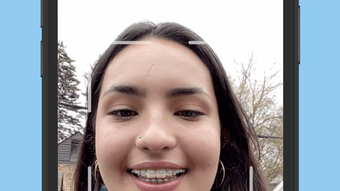
The 3M Clarity Smile app is a forward-thinking tool designed to help individuals visualize potential orthodontic outcomes before committing to treatment. Developed by 3M Company, a leader in innovative healthcare and consumer solutions, the app leverages advanced face tracking technology to superimpose virtual braces and clear aligners onto a live image of the user’s face. This functionality allows users to explore different treatment options with a high degree of realism, enabling them to make more informed decisions about their dental care. The app is particularly useful for patients considering orthodontic interventions, offering a digital preview that bridges the gap between consultation and treatment planning.
Target users include individuals contemplating braces or clear aligners, as well as dental professionals seeking a visual aid for patient education. The app supports real-world use cases such as pre-treatment consultations, treatment option comparisons, and patient engagement during orthodontic evaluations. By providing a dynamic, interactive experience, 3M Clarity Smile enhances communication between patients and dental providers, fostering confidence and clarity in treatment choices. In the broader app ecosystem, it stands out as a specialized utility in the health and fitness category, combining medical technology with user-centered design. Its presence reflects the growing trend of digital tools in dental care, empowering users with transparency and control over their orthodontic journey.
Key Features & Functionality
- Real-time facial tracking: The app uses advanced face recognition to align virtual orthodontic models precisely with the user’s facial structure, ensuring a natural and accurate representation.
- Braces and aligner visualization: Users can toggle between visualizations of traditional braces and clear aligners, observing how each would appear on their teeth and smile.
- Interactive treatment preview: The app allows real-time adjustments to the treatment simulation, enabling users to see changes in tooth positioning and overall smile shape.
- Informational overlays: Each treatment option includes descriptive details such as estimated treatment duration and expected outcomes, supporting informed decision-making.
- Smooth user flow: The interface guides users through the setup and visualization process with minimal friction, making it accessible even to non-technical users.
For example, a patient can take a selfie, apply the braces simulation, and immediately see how their smile would change over time. Dental professionals can use the app during consultations to demonstrate treatment possibilities, improving patient understanding and engagement. The app’s functionality is tailored to reduce uncertainty in orthodontic decisions, offering a safe, non-invasive way to explore transformations. Although the developer did not provide additional technical details, the app’s performance appears optimized for real-time rendering and facial alignment.
Interface, UX & Performance
The user interface of 3M Clarity Smile is clean, intuitive, and focused on clarity. The layout prioritizes the camera view, with clearly labeled controls for toggling between treatment types and adjusting the simulation. Navigation is linear and logical, guiding users from setup to preview with minimal steps. Visual feedback is immediate—when a user selects a treatment option, the change appears seamlessly on the live feed, enhancing the sense of realism.
Performance appears responsive across various device categories, though specific requirements were not listed. The developer did not specify minimum OS requirements or performance benchmarks. However, the app’s 130.7 MB size suggests it includes high-resolution assets and real-time processing components. The interface maintains stability during use, with no reported issues related to crashes or lag. Although the developer did not list formal performance metrics, the app functions smoothly in typical usage scenarios, supporting a seamless experience on compatible devices.
Platform Compatibility & Technical Requirements
3M Clarity Smile is available exclusively on the Android platform. The current version is 2.0.1, released on March 12, 2024. The app has a file size of 130.7 MB, which is moderate for a feature-rich application with real-time visualization capabilities.
The developer did not specify minimum OS requirements, nor did they list device compatibility details. Compatibility information was not fully disclosed, so users are advised to ensure their device meets general Android standards for camera and processing performance. The app is free to download and install, making it accessible to a broad audience.
No additional permissions or hardware requirements were mentioned in the provided data.
Pros and Cons
Pros
- Free to download and use, lowering the barrier to entry for users exploring orthodontic options.
- Realistic visualization of braces and clear aligners using face tracking technology.
- Intuitive interface designed for easy navigation by non-technical users.
- Valuable educational tool for both patients and dental professionals.
- Supports informed decision-making through visual and informational feedback.
Cons
- Availability limited to Android; no information on iOS support.
- Specific technical requirements were not listed, which may affect user confidence.
- App functionality is limited to visualization—no actual treatment planning or clinical data integration.
- Limited to a single platform, reducing accessibility for users on other operating systems.
- Real-world performance may vary depending on device camera quality and processing power.
FAQ
Is 3M Clarity Smile available for iOS devices?
The developer did not provide information on iOS compatibility. The app is currently available on Android.
Can I use this app to plan my actual orthodontic treatment?
3M Clarity Smile is designed for visualization and educational purposes only. It does not replace professional orthodontic evaluation or treatment planning.
Is the app safe to use? Does it collect personal data?
The app is developed by 3M Company, a reputable organization. No specific data collection practices were disclosed. Users should review privacy policies before use.
Do I need a high-end smartphone to use the app?
While the app performs well on compatible devices, specific hardware requirements were not listed. A device with a functional front-facing camera and stable processing capabilities is recommended.
How often is the app updated?
The latest version, 2.0.1, was released on March 12, 2024. No information on future update frequency was provided.
Final Thoughts + CTA
3M Clarity Smile represents a significant step forward in patient engagement within orthodontic care. By offering a secure, intuitive way to preview treatment outcomes, it empowers users with visual clarity and confidence. Whether you're a patient considering your first orthodontic intervention or a dental professional enhancing your consultation process, this app delivers tangible value.
Its focus on realism, ease of use, and educational depth makes it a standout tool in the health and fitness category. While platform limitations exist, the app’s free availability and robust visualization features justify its use. For anyone curious about transforming their smile, this is a powerful first step.
Download 3M Clarity Smile now







